

If you recently received an unexpected email from Instagram asking you to reset your password, you are not alone. Over the past several days, thousands of users reported receiving legitimate password reset emails they did not request.
The sudden wave of messages led to widespread confusion and concern about whether Instagram had suffered a data breach. Instagram and its parent company Meta deny that a breach occurred, stating instead that they fixed an issue that allowed an external party to trigger password reset emails for some users.
While the exact source of the activity remains disputed, the situation highlights a broader and more important issue. Password reset emails, even when legitimate, are often the first signal users get that their information may be exposed, reused, or being targeted by attackers.
Here is what we know so far and what this incident reveals about how password compromises really happen.
Was Instagram Hacked?
Instagram says no.
In statements reported by the BBC and BleepingComputer, Meta said it resolved a problem that allowed an external party to request password reset emails on behalf of users. The company maintains there was no breach of its systems and that accounts remain secure.
At the same time, cybersecurity researchers and firms, including Malwarebytes, have warned about a dataset circulating on hacking forums that allegedly contains information linked to more than 17 million Instagram accounts. According to reporting, that data may include usernames, email addresses, phone numbers, locations, and account IDs, but not passwords.
Some researchers believe the dataset may be a compilation of older scraped data rather than evidence of a new breach. Others say the timing of the password reset emails and the appearance of the data raises unresolved questions.
What matters for users is this: regardless of whether this was a new breach, old scraped data, or a technical abuse of password reset systems, attackers routinely use exposed personal information to launch phishing, account takeover attempts, and social engineering attacks.
What Counts as a Data Breach and What Does Not
A true data breach occurs when attackers gain unauthorized access to internal systems and steal protected data such as passwords, financial information, or private communications.
In many cases, personal data is also exposed through:
- API scraping of publicly accessible information
- Older leaks that are resold or repackaged
- Credential stuffing using passwords stolen from unrelated sites
- Abuse of account recovery or password reset features
That distinction matters because even when passwords are not leaked, exposed personal data can still be weaponized. Names, emails, phone numbers, and locations are often enough for scammers to craft convincing phishing messages that appear legitimate.
Why You Might Receive a Password Reset Email You Did Not Request
There are several common reasons this happens, and none of them require your Instagram password to be stolen.
- Someone may be testing whether your email address is linked to an account.
- Attackers may be attempting credential stuffing using passwords from past breaches.
- Your information may appear in older datasets that are being reused or resold.
- A platform bug or abuse of recovery systems may trigger reset emails at scale.
Scammers often use these moments to send fake follow-up emails that look nearly identical to legitimate ones. That is why security experts consistently recommend going directly to the app or official website rather than clicking links in unexpected messages.
What to Do If You Received an Instagram Password Reset Email
If you did not request the reset:
- Do not click links in the email.
- Open the Instagram app or visit the official site directly to review security settings.
- Check recent login activity and remove any unfamiliar sessions.
- Enable two-factor authentication (2FA) if it is not already turned on.
If you decide to change your password, make sure the new one is unique and not used anywhere else.
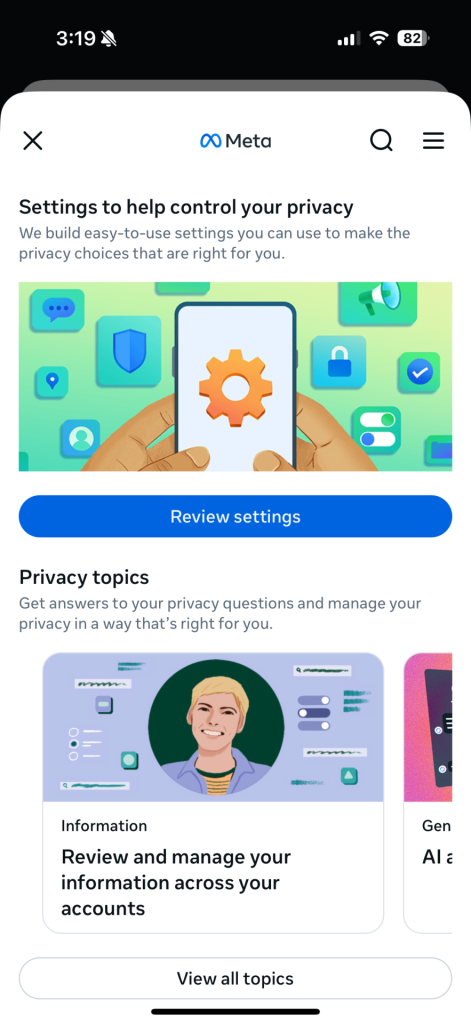
Click “Review Settings” to enable 2FA in your Account Center
How to enable multi-factor authentication for Instagram
- Click More in the bottom left, then click Settings.
- Click See more in Accounts Center, then click Password and Security.
- Click Two-factor (2FA) authentication, then select an account.
- Choose the security method you want to add and follow the on-screen instructions.
When you set up two-factor authentication on Instagram, you’ll be asked to choose one of three security methods: an authentication app, text message, or WhatsApp.
And here’s a link to the company’s full walkthrough: https://help.instagram.com/566810106808145
How to Manage Passwords the Right Way
Remembering dozens of unique, strong passwords is not realistic for most people. That is why password managers exist.
A password manager can:
- Generate strong, unique passwords for every account
- Store them securely so you do not need to remember them
- Alert you if your credentials appear in known breaches
- Reduce the risk of account takeover from reused passwords
Using a password manager removes the pressure to reuse passwords and helps close one of the most common doors attackers walk through.
McAfee’s password manager helps you secure your accounts by generating complex passwords, storing them and auto-filling your info for faster logins across devices. It’s secure and, best of all, you only have to remember a single password.
FAQ: Instagram Password Reset Emails and Account Safety
| Was my Instagram password stolen? There is no evidence that passwords were leaked in this incident. |
| Should I reset my password anyway? If you are unsure or reuse passwords elsewhere, resetting it directly in the app is a smart precaution. |
| Are the emails real or phishing? Some emails were legitimate, but scammers often mimic them. Always go directly to the app or website. |
| Why is password reuse dangerous? Because a breach on one site can expose all accounts that share the same password. |

Stay Updated
Follow us to stay updated on all things McAfee and on top of the latest consumer and mobile security threats.